Addresses that land where you plan them
I run IPv4 addressing, DHCP and ARP end to end on RouterOS — every device on the address you planned, held there by the lease and the ARP table, not by luck.
How I plan an address space
How I think before I hand out a single address. These are the habits that keep a network’s numbering predictable — and the reason a lease lands where you meant it to.
- 01
Carve a plan you can read
The plan is hierarchical on purpose — the address tells you the site, the role and the segment before you look anything up, and because it is structured that way it summarizes cleanly upward. A plan you can read at a glance is a plan that is still right years later.
- 02
Bind what must not move
Anything that must keep its address gets it from the DHCP server, reserved by its hardware — the server stays the single source of truth, nothing hand-set off the books. Core infrastructure is the one exception, addressed by hand so it survives even a dead server. And where a segment must not accept strangers I lock it — reply-only ARP, server-written entries — so an address set outside the plan cannot pass.
- 03
Keep it local, keep it simple
DHCP lives where it is used — on the segment’s own gateway — not funnelled through one authority I then reason about from a distance. Fewer moving parts, nothing to misconfigure between a client and its lease. A central server and relay is a tool I know and reach for when a design genuinely needs one policy across many segments — but that is the exception, not the reflex.
- 04
The table first, then the wire
The lease table and the logs answer most of what goes wrong — a conflict, a duplicate, a binding that will not hold. When they say one thing and the network does another, I drop to the exchange itself and read the Discover–Offer–Request–Acknowledge on the wire, where the packets cannot lie. It is the part I have run longer than I have studied.
What I run in production
The addressing, DHCP and ARP that run live on RouterOS — the numbering, the leases, and the bindings that keep every device where the plan put it.
Command by area
1 Learning · 2 Aware · 3 Confident · 4 Fluent · 5 Teach
- deployed leaf
- deployed ahead of the textbook
IP Addressing (1)
- IP AddressingTeach
ARP & ARP Modes (2)
- ARP TableTeach
- ARP ModesTeach
DHCP Server (4)
- Server Setup & LeasesTeach
- DHCP OptionsTeach
- DHCP Communication AnalysisTeach, deployed ahead of the textbook
- DHCP Client IdentificationTeach, deployed ahead of the textbook
DHCP Client (1)
- DHCP ClientTeach
DHCP Relay (1)
- giaddr (Relay Agent Information)Teach
Grouped by curriculum topic, deepest first. Solid indigo runs to the depth I deploy in production; the two dashed notches (DHCP internals) are where deployment ran ahead of the studied detail.
Every device on the address you planned.
Addresses drawn from a planned pool; the gateway, DNS and lease time carried by the matching network object, selected by the segment a lease falls in.
Reserved devices that never drift.
A device that must keep its address is pinned to its hardware, and the server writes the matching ARP entry itself as the lease binds — so the reservation holds without a second system to maintain.
A segment locked to who belongs on it.
Set an interface to answer ARP by reply only and it learns nothing on its own: legitimate clients, entered as their leases bind, pass; anyone who hand-sets an address outside the plan gets no entry and cannot move. The static-address squatter, shut out.
DHCP carried across subnets when a design needs one authority.
A relay on each client segment stamps where the request came from and forwards it to a central server, which reads that stamp to pick the right range — per-line policy on the relay-agent tag (Option 82, RFC 3046). The default stays local and simple; this is the tool for when it cannot.
A misbehaving lease traced to its cause.
Most of it shows in the lease table and the logs — a conflict, a duplicate, a binding that will not hold. What they cannot explain, the packets can: the DHCP exchange itself, read on the wire.
The DHCP & ARP mechanisms, named
- Addressing
- secondary addresses · /ip pool ranges
- DHCP server
- per-interface server · network object · lease lifecycle
- Binding
- static lease · add-arp · reply-only ARP
- DHCP relay
- giaddr stamping · relay= match · local-address
- Per-line policy
- Option 82 — Agent Circuit ID / Remote ID (RFC 3046)
- Client identity
- dynamic-lease-identifiers — client-id / client-mac
The primitives an addressing job actually turns on — each one I run, not just know.
Hard-won
The defaults I change because I have paid for them — lessons from production, not from the manual.
- The default I always change
Change one DHCP default, and your router outlives its lease table.
RouterOS writes its DHCP leases to the router’s onboard flash on a timer; by default it coalesces the changes and writes at most every five minutes. On a busy segment there is always something to flush, so it keeps writing on that timer without pause. In a crowded place, a hotspot or a packed office, that is a steady drip of writes to NAND that was never meant to take them. I have lost routers to it: the flash wears out, and one day the board does not come back. It is not a fault; it is a default almost nobody questions until they have replaced dead hardware. So for ten years my first move on every DHCP server has been the same one line — the leases stored nowhere but RAM, the flash left alone. The cost is close to nothing: on a reboot the clients ask again and are back in a second, and the server pings before it ever reuses an address. The benefit is the router’s lifespan. I set it on every deployment, and I tell every customer and every student the same thing.
/ip dhcp-server config set store-leases-disk=never
Cut one network into subnets
One network. 254 hosts. · /24
Where you draw the line — the prefix — is the whole game. I draw it on clean, summarizable boundaries first and fit the hosts into them second, not the other way around: a plan that aggregates is worth more than a subnet sized to the exact host count. Move the prefix and watch the trade every plan makes — more subnets, fewer hosts in each.
Want just the drag, to keep or to share? The lab lives on its own here — a visual subnet calculator you can bookmark. Open the standalone calculator →
Where the address plans come from
Address planning stopped being about tidiness for me the day a remote user could not reach the office — because the hotel Wi-Fi and our network had picked the same subnet. Here is where the discipline came from, and the rule it left me.
- The mess that made me a planner
A remote worker whose hotel Wi-Fi used the same subnet as the office.
The road warriors taught me the first hard lesson. Someone works from a home network, a hotel or a café and connects back to the enterprise over the VPN — but the router in front of them hands out 192.168.0.0/24 or 192.168.1.0/24, the exact range an important internal resource is sitting on. The two networks overlap, the routes collide, and the resource is simply unreachable. Almost every consumer router and public hotspot ships those same popular ranges, so it is not an edge case — it is the norm, and pushing custom routes around it is a running pain. That is when addressing stopped being tidiness for me and became the thing that decides whether remote access works at all: put internal networks on ranges the rest of the world does not use, and the collision never happens.
- The rule I kept
The address tells you where you are.
Out of that came the rule I have kept since: the address carries the location. An octet — sometimes just a few bits — maps to the site, the role, the segment, so anyone reading an address knows where the device sits and what it does without opening a spreadsheet. The structure is the documentation. And numbering that encodes place is numbering that aggregates, so the plan stays compact as it grows.
A real production address-space & subnetting plan — coming soon
Addresses that land where you planned them, held there by the lease and the table — and never moving by accident. That is the whole of the brief.
Where addressing connects
Addressing is the plane the rest of the stack is numbered on. The domains that lean on it, and the exams that verify the depth.
- Related domainRoutingThe routes that sit on top of this plan — resolved against the addresses and boundaries laid out here.
- Related domainFirewall & NATWhere the addresses meet policy — the NAT and rules that sit on top of the segments DHCP hands out.
- Related domainSecurityThe posture the locked segments here serve — threat-model first, with hostile traffic dropped at the edge.
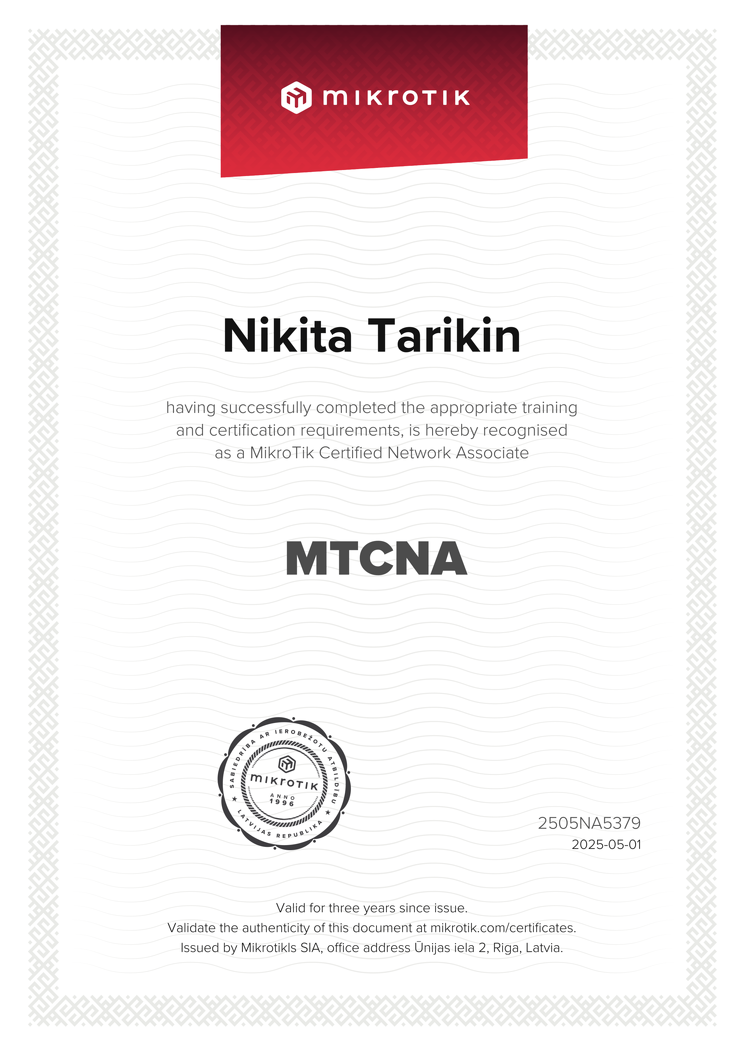
This is the issued MTCNA certificate — the network-associate exam behind the addressing, DHCP and ARP claims, shown whole.
Certificate ID 2505NA5379 — cross-checkable on mikrotik.com.
Bring the addressing problem — an IPv4 plan, a DHCP server or relay, or an ARP-locked segment on RouterOS. I will scope it.
Scope my addressing problem